 Built for Solana
Your crypto. Your card. Your everyday.
Spend your crypto with a premium virtual card built for Solana. Add it to Apple Pay or Google Pay and tap your phone to pay in stores.
Works with Apple Pay and Google PayVela, in 30 seconds.
Tap to pay, a card in a minute, cashback in SOL. Turn the sound on.
Apple Pay Google Pay
Your crypto, in Apple Pay and Google Pay.
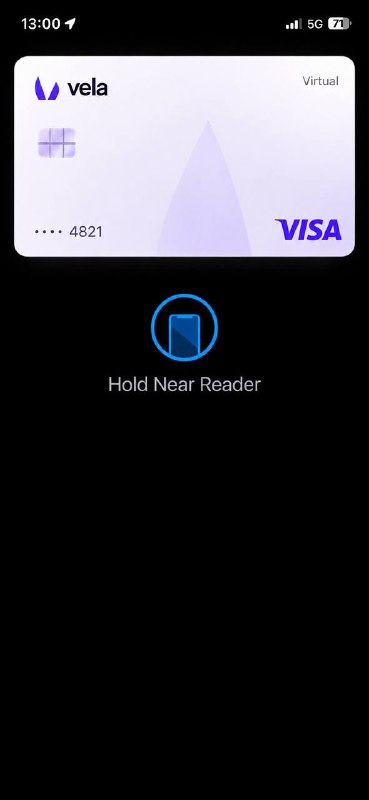
Add your Vela card to your phone's wallet, then pay in stores with a tap. Your SOL is converted at checkout.
Add your card to Apple Wallet or Google Wallet from the Vela app.
Double-click the side button on iPhone, or unlock your Android phone.
Hold near the reader until you see Done.
- Card fee
- Free
- Apple Pay & Google Pay
- Included
- Spending limit
- $3,000/day
Built for the next generation of crypto payments.
-
Never your seed phrase
Vela will never ask for your seed phrase or private keys. Not by email, not in chat, not anywhere.
-
Terms before you commit
Fees, limits and eligibility are shown before you create a card, not after.
-
No jargon required
If you can pay with a card, you can use Vela. The crypto part stays simple.
Crypto in. Card out.
Your SOL balance, your card and your cashback, in one clear view.
Example: the Vela app shows a balance of 2.48 SOL, about $372, the card added to Apple Pay, three recent payments and $1.30 of cashback this week.
Made for spending, not just holding.
Example: a $5.80 Starbucks payment made with Apple Pay, paid with 0.039 SOL and approved.
Example: $1.30 of cashback this week, 3% on Spotify, Uber and Starbucks.
Example: a top-up of 1.20 SOL confirmed on Solana.
Example: wallet connected, card created, card added to Apple Wallet, ready to spend.
3% cashback on eligible spending
Pay with your Vela card and get 3% back on eligible purchases.
Example: three purchases of $12.99, $24.50 and $5.80 earn $1.30 in cashback.
Cashback applies to eligible purchases only. Eligible categories, caps and conditions apply and may change.
Deposit $100, get $20 in SOL
Create your card, top it up with $100 and we add $20 in SOL on top. That's $120 to spend, subject to applicable terms.
Reward credited after your first $100 deposit, once eligibility conditions are met. Offer terms apply.
 in SOL for a $100 deposit
Built on Solana
The speed and efficiency of Solana, paired with a simple card experience.
-
Fast confirmations
Transactions on Solana typically confirm in seconds.
-
Low network fees
Solana network fees are usually a fraction of a cent.
-
Wallet-native
Fund your card from the Solana wallet you already use.
Questions, answered.
Something else on your mind? Contact us.
Vela is a virtual payment card for the Solana ecosystem. You fund it with crypto from your wallet and use it for everyday purchases, wherever eligible card payments are supported.
Yes. Add your Vela card to Apple Wallet on iPhone or to Google Wallet on Android from the app, then hold your phone near any contactless reader to pay in stores. You can also pick it at checkout in apps and on websites. Availability depends on your device, your region and the card program.
Yes. The Vela card is free, with no card fee, and nothing is held back: Apple Pay, Google Pay and online payments are all included. The only limit is on spending, capped at $3,000 per day.
Eligible purchases made with your card earn up to 3% cashback. Eligible categories, caps and the way cashback is paid out are set out in the reward terms, which may change over time.
Create your card and deposit $100 or more. Once your deposit is confirmed and you meet the offer conditions, $20 is credited to your card in SOL. The offer is subject to its terms and may change or end.
Vela is built for the Solana ecosystem. The list of supported assets will be published at launch and may vary by region.
In stores with Apple Pay or Google Pay, and online and in apps, wherever eligible card payments are supported. Availability depends on your region and on the terms of the card program.
Ready to spend crypto differently?
Works with Apple Pay and Google Pay.
Deposit $100, get $20 in SOL. Terms apply.